import sqlite3
import pandas as pdDesigning Data
Python
SQL
schema design
data engineering
The fifth notebook in the Data Engineering stream. The survey office is replacing the pilot’s spreadsheet with real intake software, and we must make the database design: entities and relationships, primary and foreign keys, and a schema written in DDL.
Outline
Prerequisites
- Notebook 4 of this stream: cleaning messy data as code.
Learning Outcomes
By the end of this notebook you will be able to:
- Draw a data model: entities, attributes, relationships and their cardinality.
- Explain primary keys, foreign keys and referential integrity, and say which problem from the pilot each one would have prevented.
- Write a schema in DDL with types and constraints, and say what each rule protects.
- Predict which rows a schema will refuse, and read the database’s error when it does.
- Explain one fact, one place, and when to break it on purpose.
1. Where we are in the stream
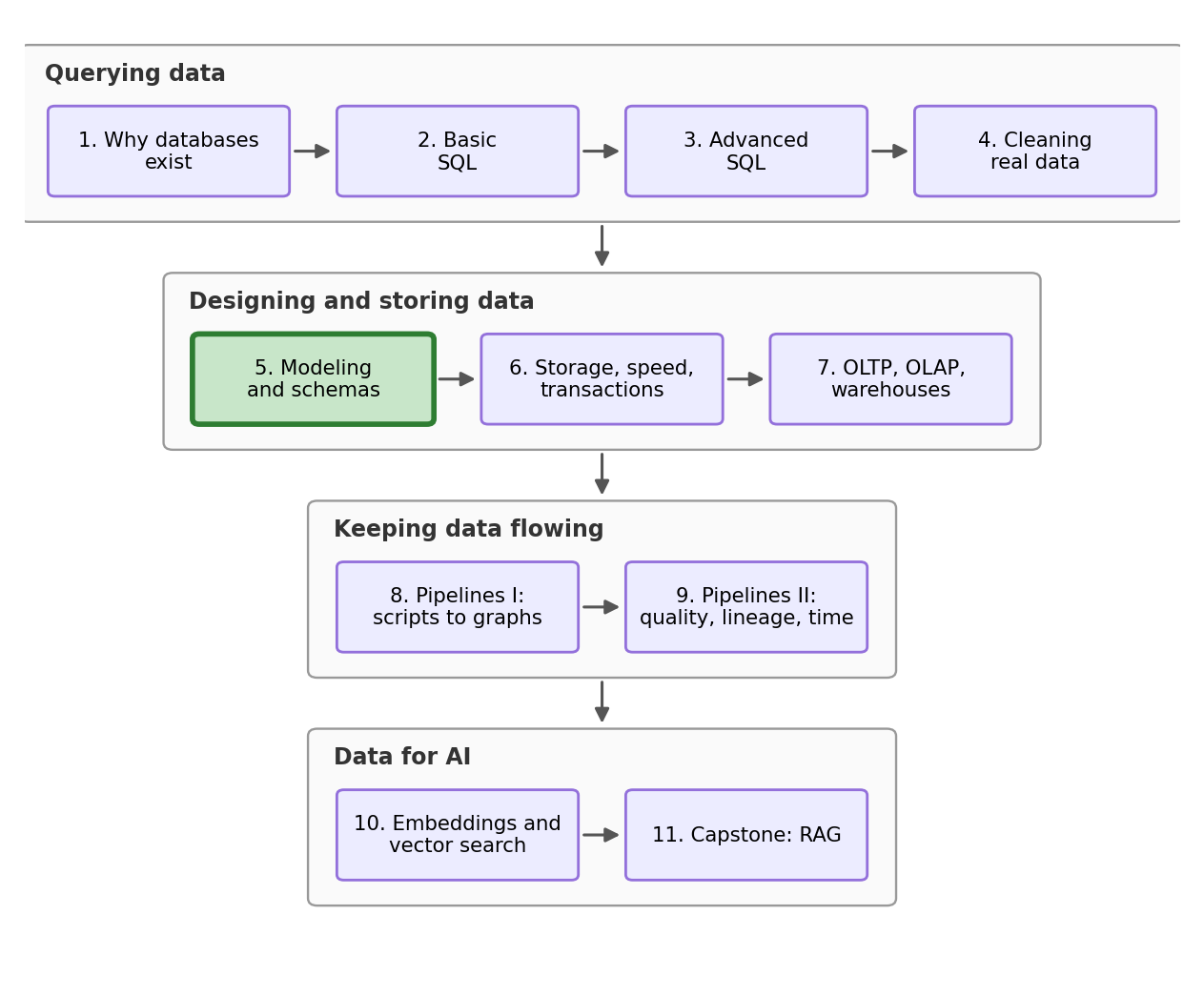
Notebook 4 ended with the pilot report delivered: an average wage of 25.40, rescued from a spreadsheet where one man had four names and one column quietly changed meaning in April (along with other errors). The report went over well. This morning there is a new message waiting.
The commission, from the research lead. “The pilot taught everyone a lesson. Wave 2 of the survey launches in the fall, and the office is replacing the spreadsheet with proper intake software. Before they write it, they need the database design from us. Deliverable: the tables, the rules, and proof that what happened to the pilot cannot happen again.”
Here we are finally being asked for something different. We are not writing a query or cleaning a file, we need to make a design. This is the notebook where we stop working around other people’s tables and decide what the tables are.
2. What to_sql never gave us
Every database this stream has built so far came from one command: to_sql, which takes a dataframe and turns it into a table. We start the design work by looking closely at what that command actually produces, in a fresh database file so nothing here touches the working copy from Notebooks 1 to 4.
conn = sqlite3.connect("datasets/wage_survey_designed.db")

pd.read_csv("datasets/wage_survey.csv").to_sql("survey_staging", conn, index=False, if_exists="replace")
pd.read_csv("datasets/provinces.csv").to_sql("province_staging", conn, index=False, if_exists="replace")
pd.read_csv("datasets/certifications.csv").to_sql("certification_staging", conn, index=False, if_exists="replace")684The 684 is the row count of the last table written, the certifications. Tables loaded this way, raw and waiting to feed the real tables we will build next to them, are called staging tables, and the _staging suffix is a common convention for marking them.
%load_ext sql
%config SqlMagic.autopandas = True
%config SqlMagic.displaycon = False
%config SqlMagic.feedback = 0
%sql sqlite:///datasets/wage_survey_designed.db
Back in Notebook 1 we asked the database to describe a table with PRAGMA table_info and looked at two of the columns it returned, the name and the type. Here is the same command with nothing hidden:
pd.read_sql("PRAGMA table_info(survey_staging)", conn)| cid | name | type | notnull | dflt_value | pk | |
|---|---|---|---|---|---|---|
| 0 | 0 | respondent_id | INTEGER | 0 | None | 0 |
| 1 | 1 | age | INTEGER | 0 | None | 0 |
| 2 | 2 | gender | TEXT | 0 | None | 0 |
| 3 | 3 | education | TEXT | 0 | None | 0 |
| 4 | 4 | province | TEXT | 0 | None | 0 |
| 5 | 5 | industry | TEXT | 0 | None | 0 |
| 6 | 6 | union_member | INTEGER | 0 | None | 0 |
| 7 | 7 | weekly_hours | REAL | 0 | None | 0 |
| 8 | 8 | hourly_wage | REAL | 0 | None | 0 |
Read the two columns on the right. notnull is 0 the whole way down, this means that every field is optional, and a row of nothing but blanks would be accepted. We can submit nothing into the table and it will be valid. pk is 0 the whole way down too, and that column is where a table records which field identifies a row, so this table has no idea which respondent is which. Nothing anywhere says that province should match the province table. Names and types are everything to_sql gave us.
And even the types are weaker than they look. weekly_hours is declared REAL, so let’s hand it a word and see. typeof asks SQLite what a stored value actually is:
%%sql
INSERT INTO survey_staging (respondent_id, weekly_hours) VALUES (9999, 'forty');
SELECT respondent_id, weekly_hours, typeof(weekly_hours) AS stored_as
FROM survey_staging
WHERE respondent_id = 9999| respondent_id | weekly_hours | stored_as | |
|---|---|---|---|
| 0 | 9999 | forty | text |
The word forty went into a REAL column and was stored as text, no error raised, in a row that is otherwise entirely blank. Notebook 1 promised that in a database a wage column holds numbers, so refused or none cannot live in it. That is true of a database somebody designed: our schema was inferred automatically from a dataframe, and writing one ourselves was a job for later. The job has arrived. First, take the fake row back out:
%%sql
DELETE FROM survey_staging WHERE respondent_id = 9999
3. Drawing the data before you build it
A design starts on paper, and the vocabulary for the drawing has three key words.
An entity is a kind of thing you keep records about: a respondent, a province, a certificate. An attribute is a fact about one of those things: a respondent’s age, a province’s minimum wage. A relationship connects two entities, and the useful part of a relationship is its cardinality: how many of one go with how many of the other.
- One to many (1-N). One province is home to many respondents, and each respondent lives in one province. The most common relationship you will meet.
- Many to many (M-N). One respondent can hold several certificates, and one certificate is held by many respondents. This does not fit in either entity’s table, so it gets a table of its own that holds the pairs.
- One to one (1-1). One respondent, one passport number or email. Rare, and usually a sign that two tables should be one, unless you are splitting off something sensitive or rarely used.
Here are our three entities and two relationships, drawn in the standard notation:
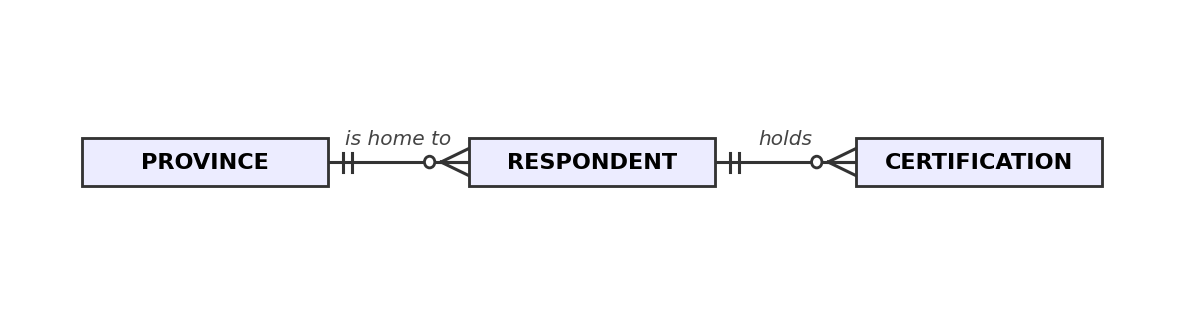
The crow’s foot symbol (the three-pronged end of each line) marks the “many” side. Read the top line as one province, many respondents. Both of our relationships are one-to-many on the diagram. The many-to-many between respondents and certificates has been split into two one-to-many links through the CERTIFICATION table, which holds one row per pair. A table with that purpose is called a bridge table, and it is how every M-N relationship is actually stored.
You may also have noticed the entity names went singular: RESPONDENT where four notebooks said survey. A designed table is conventionally named for what one of its rows stands for, one respondent, one province, one person-certificate pair. Notebook 2 called that idea the grain, here we write it explicitly into the design.
4. Identity and links: keys
The drawing so far says what the tables are. Two more ideas say how rows get an identity and how tables hold together, they are exactly what the pilot file was missing.
A primary key is the attribute that says which row is which: it must be present and it must never repeat. For us respondent_id is our survey’s primary key. The pilot had no primary key at all, which is exactly why Notebook 4 spent half its length working out whether Tremblay, Luc, Luc Tremblay and Tremblay, L. were one person. Identity was never recorded, so it had to be reconstructed.
A foreign key is a column that points at another table’s primary key. respondent.province points at province.province, and the rule the database then enforces is called referential integrity: you cannot point at a row that does not exist. That is the rule that would have refused Britsh Columbia on the way in, because no such province was ever in the lookup table.
The bridge table’s key is more special. Respondent 8 appears on more than one row, and so does any popular certificate, so the key is both columns together: a composite key. This is convenient as the pair itself can never repeat. Nobody can be recorded as holding the same certificate twice.
Here is the diagram again with the keys marked, which makes it the finished data model:
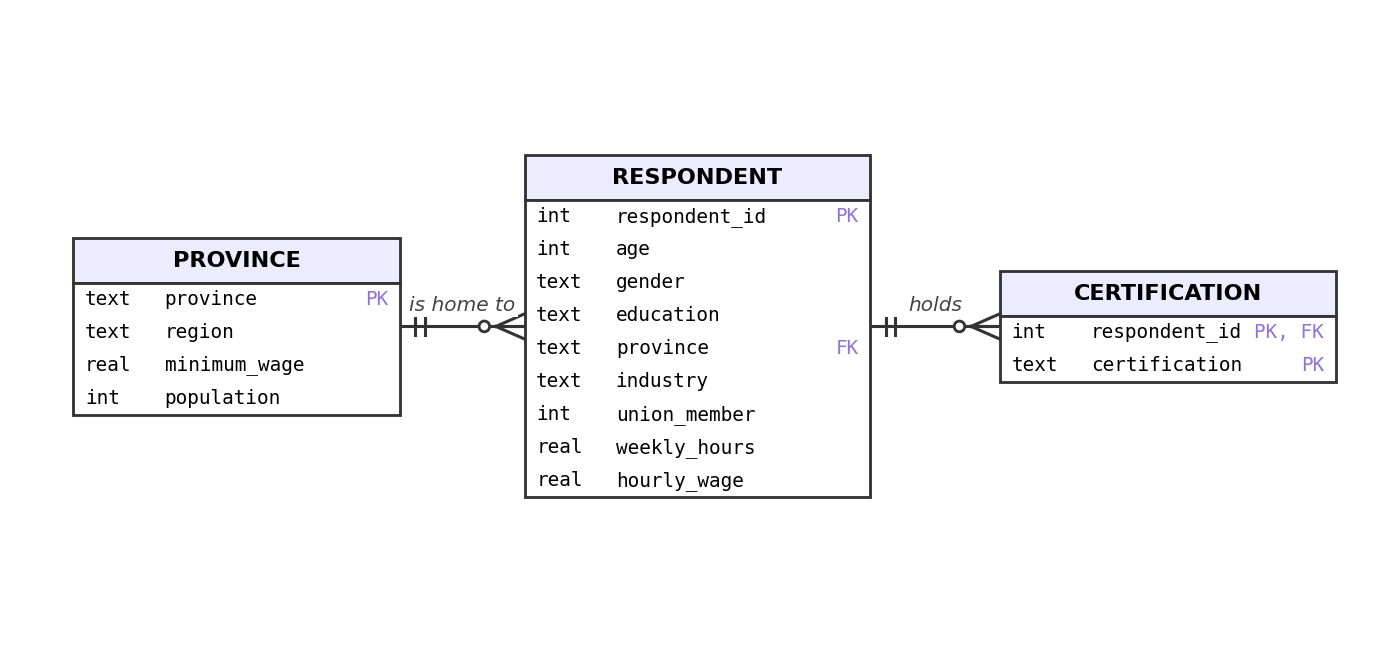
In the province table the province column itself is the primary key: the name is already unique, so it needs no artificial id, and it is the value the respondent table’s foreign key points at.
Our model has three tables. A real production model has more, but it reads exactly the same way. Here is one for a small equipment-hire business:
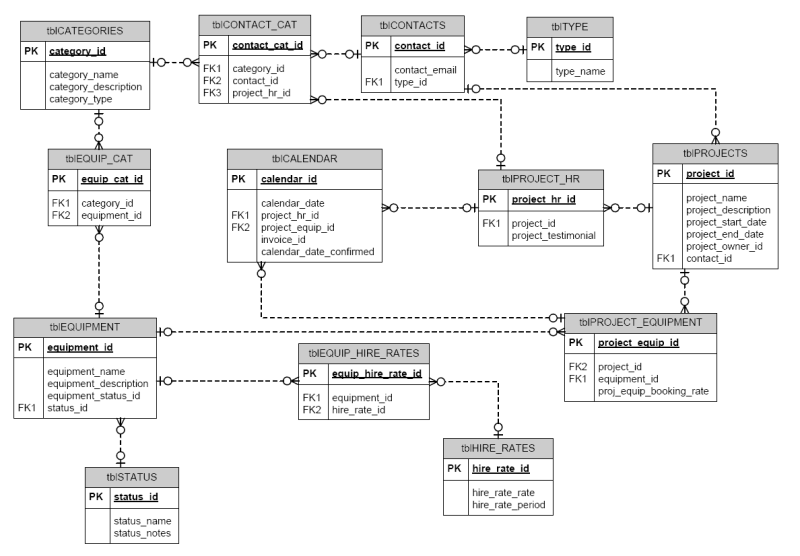
tblPROJECT_EQUIPMENT on the right is a bridge table doing exactly our certification table’s job, with one addition worth noticing: it carries a fact of its own, the booking rate, because some facts belong to the pair itself.5. Grains
Notebook 2 gave us the word for what one row of a table stands for: its grain. A primary key is the grain written down where the database can enforce it. Let’s count our three grains from the staging tables:
%%sql
SELECT 'provinces (1 row per province)' AS grain, COUNT(*) AS row_count FROM province_staging
UNION ALL
SELECT 'respondents (1 row per person)', COUNT(*) FROM survey_staging
UNION ALL
SELECT 'certifications (1 row per person-certificate pair)', COUNT(*) FROM certification_staging
UNION ALL
SELECT 'people holding at least one certificate', COUNT(DISTINCT respondent_id) FROM certification_staging
UNION ALL
SELECT 'distinct certificates on offer', COUNT(DISTINCT certification) FROM certification_staging| grain | row_count | |
|---|---|---|
| 0 | provinces (1 row per province) | 5 |
| 1 | respondents (1 row per person) | 1000 |
| 2 | certifications (1 row per person-certificate p... | 684 |
| 3 | people holding at least one certificate | 452 |
| 4 | distinct certificates on offer | 10 |
Ten certificates spread over 452 people produce 684 pairs, which is what a many-to-many relationship looks like from the inside. And grain is not bookkeeping; it changes answers. Notebook 2 averaged wages over the 684-row join and got 39.89, and Notebook 3 collapsed it to one row per person and got 39.44. The grain we used changed the answer.
It changes models the same way. A regression run on person rows estimates something about people; the identical regression run on person-certificate rows estimates something about certificate holdings, with every multi-certificate person counted once per certificate. Those are two different models. When a schema names the grain of every table, the mistake of mixing them has to be made on purpose and is now not accidental.
6. Writing it down: DDL
Now we translate the model into SQL. The part of the language that creates and changes the shape of a database, rather than the data in it, is called DDL (Data Definition Language), and CREATE TABLE is its main command.
Two settings first. SQLite ships with foreign key enforcement switched off. The setting lives on the connection, not in the file, so every script that touches the database has to check it and switch it on:
%%sql
PRAGMA foreign_keys| foreign_keys | |
|---|---|
| 0 | 0 |
Zero: enforcement is off, exactly as warned. We now swap it on:
%%sql
PRAGMA foreign_keys = ON
The other is STRICT, a newer SQLite feature that fixes section 2’s forty problem: put the word after a CREATE TABLE’s closing bracket and the declared types become binding, so a REAL column refuses text instead of keeping it.
Before creating tables we drop any old versions, so that no foreign key is ever left pointing at a table that has just vanished:
%%sql
DROP TABLE IF EXISTS certification;
DROP TABLE IF EXISTS respondent;
DROP TABLE IF EXISTS province
The province table comes first, since other tables will point at it. Read the comments on the right: every one is a rule about the world that we are asking the database to enforce from now on.
%%sql
CREATE TABLE province (
    province     TEXT    PRIMARY KEY,                        -- the name identifies the row, so it cannot repeat
    region       TEXT    NOT NULL,                           -- every province belongs to a region
    minimum_wage REAL    NOT NULL CHECK (minimum_wage > 0),  -- CHECK refuses any row failing the test
    population   INTEGER NOT NULL CHECK (population > 0)
) STRICT
The cell prints nothing, which is what we want: like CREATE VIEW in Notebook 3, CREATE TABLE changes the shape of the database and returns no rows.
Wrong-query gallery #4
The respondent table is the big one, and a colleague has sent over a draft for it:
CREATE TABLE respondent (
    respondent_id INTEGER,
    age           INTEGER,
    gender        TEXT,
    education     TEXT,
    province      TEXT,
    industry      TEXT,
    union_member  INTEGER,
    weekly_hours  REAL,
    hourly_wage   TEXT
)
This runs without a single error, which in this case is really bad. A bad query fails in front of you, or in the next command, but a bad schema fails months later, one accepted row at a time. Before opening the answer: how many of the pilot’s problems would this table have stopped?
Show / hide answer
None of them. There is no PRIMARY KEY, so the same person can be entered any number of times and the table has no idea, which is the pilot’s four-named Luc Tremblay all over again. There is no REFERENCES, so Britsh Columbia is accepted. Nothing is NOT NULL, so a row of pure blanks is a valid record. hourly_wage is typed TEXT, which accepts refused just as readily as actual numeric values. And without STRICT, even the types that are declared are only suggestions (so numbers can go into hourly_wage anyway). This is the same as our .csv, nothing meaningful changed.
Here is the version we ship instead, with every gap from the draft closed:
%%sql
CREATE TABLE respondent (
    respondent_id INTEGER PRIMARY KEY,                              -- one row per person, and no repeats
    age           INTEGER NOT NULL CHECK (age BETWEEN 15 AND 100),  -- outside this range it is a typo, not an age
    gender        TEXT    NOT NULL,
    education     TEXT    NOT NULL,
    province      TEXT    NOT NULL REFERENCES province(province),   -- must match a province we actually have
    industry      TEXT    NOT NULL,
    union_member  INTEGER NOT NULL CHECK (union_member IN (0, 1)),  -- a yes/no answer, and nothing else
    weekly_hours  REAL    NOT NULL CHECK (weekly_hours BETWEEN 0 AND 100),  -- 100 hours weekly is the maximum we permit
    hourly_wage   REAL    NOT NULL CHECK (hourly_wage > 0)          -- no blanks, no -1, no 9999999
) STRICT
Your turn. One table left, and it is yours: write
CREATE TABLEforcertification. It needs two columns,respondent_idandcertification, both required; the pair as a composite primary key, writtenPRIMARY KEY (col1, col2)on its own line; a foreign key to the respondent table; andSTRICT. Draft it in the cell below, then check against the answer. Don’t forget to start the cell with%%sql!
# your CREATE TABLE hereShow / hide answer
%%sql
DROP TABLE IF EXISTS certification;
CREATE TABLE certification (
    respondent_id INTEGER NOT NULL REFERENCES respondent(respondent_id),  -- must be a person who exists
    certification TEXT    NOT NULL,
    PRIMARY KEY (respondent_id, certification)                            -- the pair is the key: no duplicates
) STRICT
The DROP TABLE IF EXISTS in front makes the cell safe to run whether or not your own draft already created the table.
Five kinds of rule, every database
The rules inside a CREATE TABLE are called constraints, and the five you just wrote cover most schemas you will ever read. PRIMARY KEY gives a row its identity. REFERENCES points a column at another table and enforces referential integrity. NOT NULL makes a fact required rather than optional. CHECK accepts any condition you can write and refuses rows that fail it. STRICT makes the declared types binding.
Notice what is not in the schema. There is no rule that respondents in Alberta earn less than respondents in Ontario, because that is a finding, not a fact about what a valid record is. A schema encodes what must be true for a record to be a record at all, and does not ask anything of the data itself.
7. Load day
The staging tables are already sitting in the file, so loading the real tables is INSERT INTO ... SELECT: Notebook 3’s INSERT, except the rows come from a query instead of a typed-out VALUES list. Provinces first, since everything points at them:
%%sql
INSERT INTO province SELECT province, region, minimum_wage, population FROM province_staging
Five provinces in, no complaints. Now the people.
Predict first.
survey_stagingholds 1,000 rows, every one a real respondent from the survey we have queried for four notebooks. How many of them make it intorespondent?
%%sql
INSERT INTO respondent
SELECT respondent_id, age, gender, education, province, industry, union_member, weekly_hours, hourly_wage
FROM survey_staging
RuntimeError: (sqlite3.IntegrityError) FOREIGN KEY constraint failed
[SQL: INSERT INTO respondent
SELECT respondent_id, age, gender, education, province, industry, union_member, weekly_hours, hourly_wage
FROM survey_staging]
(Background on this error at: https://sqlalche.me/e/20/gkpj)FOREIGN KEY constraint failed, and the load is refused. The database has stopped us before, but this is a new kind of error. Notebook 2’s misuse of aggregate and Notebook 3’s window function error were complaints about our questions. This is the first time it has refused our data, and if you predicted 1,000, the surprise is the lesson: constraints check the world, not the syntax.
%%sql
SELECT COUNT(*) AS rows_in_respondent FROM respondent| rows_in_respondent | |
|---|---|
| 0 | 0 |
The answer to the prediction is zero. Not 954 either (which was the number Notebook 2’s inner join would have kept): a single INSERT finishes completely or not at all, so there is no partially-loaded table to clean up. We will revisit that all-or-nothing guarantee in Notebook 6. Somewhere in those 1,000 rows is a respondent pointing at a province our lookup table does not have, and rather than load around them, the database threw the whole statement back at us.
Finding the value is a job we already know how to do, the left join from Notebook 2:
%%sql
SELECT DISTINCT s.province
FROM survey_staging AS s
LEFT JOIN province AS p ON s.province = p.province
WHERE p.province IS NULL| province | |
|---|---|
| 0 | Saskatchewan |
Saskatchewan. The same 46 respondents an inner join silently deleted in Notebook 2, and look at what the foreign key did: the identical gap that once quietly skewed our average is now a hard stop, before the data is even loaded. The data was never wrong; our province table was just incomplete. So we complete it, from the same sources as the rest of that table, the federal minimum wage database and Statistics Canada’s population estimates:
%%sql
INSERT INTO province VALUES ('Saskatchewan', 'Prairies', 15.00, 1253569)
With the lookup fixed, both loads run clean:
%%sql
INSERT INTO respondent
SELECT respondent_id, age, gender, education, province, industry, union_member, weekly_hours, hourly_wage
FROM survey_staging;
INSERT INTO certification SELECT respondent_id, certification FROM certification_staging
One query with three small subqueries computes the result of our load:
%%sql
SELECT (SELECT COUNT(*) FROM province) AS provinces,
       (SELECT COUNT(*) FROM respondent) AS respondents,
(SELECT COUNT(*) FROM certification) AS certifications| provinces | respondents | certifications | |
|---|---|---|---|
| 0 | 6 | 1000 | 684 |
Six provinces, 1,000 respondents, 684 certification pairs, all of it now living under rules. The first half of our task is done.
8. The acceptance test
The second half of our task was proof: what happened to the pilot cannot happen again. So we prove it the direct way. Each of the following cells recreates one of the pilot file’s actual problems as a fresh INSERT and hands it to our schema. If the design is right, every single one should be outright rejected.
The pilot recorded one man under four names, because nothing tracked identity. Here is a second respondent arriving under an id that is already taken:
%%sql
INSERT INTO respondent VALUES (1, 41, 'Woman', 'Graduate degree', 'Alberta', 'Technology', 0, 40.0, 55.0)
RuntimeError: (sqlite3.IntegrityError) UNIQUE constraint failed: respondent.respondent_id
[SQL: INSERT INTO respondent VALUES (1, 41, 'Woman', 'Graduate degree', 'Alberta', 'Technology', 0, 40.0, 55.0)]
(Background on this error at: https://sqlalche.me/e/20/gkpj)Refused: the primary key says respondent 1 already exists. The pilot spelled one province four ways; here comes the most famous of them:
%%sql
INSERT INTO respondent VALUES (2001, 33, 'Man', 'High school', 'Britsh Columbia', 'Retail', 0, 38.0, 24.0)
RuntimeError: (sqlite3.IntegrityError) FOREIGN KEY constraint failed
[SQL: INSERT INTO respondent VALUES (2001, 33, 'Man', 'High school', 'Britsh Columbia', 'Retail', 0, 38.0, 24.0)]
(Background on this error at: https://sqlalche.me/e/20/gkpj)Refused: Britsh Columbia is not a row in the province table, and referential integrity does not negotiate. The pilot used -1 as a code for “did not know”:
%%sql
INSERT INTO respondent VALUES (2002, 33, 'Man', 'High school', 'Alberta', 'Retail', 0, 38.0, -1)
RuntimeError: (sqlite3.IntegrityError) CHECK constraint failed: hourly_wage > 0
[SQL: INSERT INTO respondent VALUES (2002, 33, 'Man', 'High school', 'Alberta', 'Retail', 0, 38.0, -1)]
(Background on this error at: https://sqlalche.me/e/20/gkpj)Refused: the CHECK on hourly_wage demands a positive number, so sentinel codes throw errors. The pilot’s wage column also contained the literal word refused:
%%sql
INSERT INTO respondent VALUES (2003, 33, 'Man', 'High school', 'Alberta', 'Retail', 0, 38.0, 'refused')
RuntimeError: (sqlite3.IntegrityError) cannot store TEXT value in REAL column respondent.hourly_wage
[SQL: INSERT INTO respondent VALUES (2003, 33, 'Man', 'High school', 'Alberta', 'Retail', 0, 38.0, 'refused')]
(Background on this error at: https://sqlalche.me/e/20/gkpj)Refused: STRICT will not store text in a REAL column, which is the forty demonstration from section 2 with the ending it should have had. Last, a certificate for respondent 9999, who does not exist:
%%sql
INSERT INTO certification VALUES (9999, 'Cloud Practitioner')
RuntimeError: (sqlite3.IntegrityError) FOREIGN KEY constraint failed
[SQL: INSERT INTO certification VALUES (9999, 'Cloud Practitioner')]
(Background on this error at: https://sqlalche.me/e/20/gkpj)Refused: a bridge table’s foreign key means a pair can only ever connect two rows that are really there. Five errors from the pilot, five refusals, each error message naming the rule that fired. And the table is exactly as we left it:
%%sql
SELECT COUNT(*) AS respondents FROM respondent| respondents | |
|---|---|
| 0 | 1000 |
Still 1,000. Nothing leaked through to poison our data.
We can connect these refusals back to Notebook 1’s table of what goes wrong with shared files. The same person stored several times: refused by the primary key. Free text where a fixed set of values was intended: refused by the foreign key. A column that holds whatever anyone types: refused by STRICT and CHECK. The update anomaly is section 9’s subject.
Notebook 4 found every one of these problems after the fact, by writing queries to hunt them down. Here they never get in. That is the switch this notebook makes: a good design versus a whole notebook’s worth of cleaning.
Constraints are a theory of your data
Every line of the schema is a claim about the world: wages are positive, every respondent has exactly one province, a person holds a given certificate once. Writing the claims down does two things at once: the database enforces them, and the next person to open the file can read what you believed and argue with you. A rule in a schema is a rule nobody has to remember.
9. One fact, one place
One design question remains: why three tables? A single wide table with the province facts copied onto every respondent would be simpler to look at, and plenty of real spreadsheets are built like this. We have a database now, so instead of arguing we can build the wide version and watch what goes wrong. CREATE TABLE ... AS builds a table directly from a query’s output, types inferred and no constraints attached, which suits this specific case: the wide version is supposed to live without our rules as they don’t fit it anyway.
%%sql
DROP TABLE IF EXISTS survey_wide;
CREATE TABLE survey_wide AS
SELECT r.respondent_id, r.province, r.hourly_wage, p.region, p.minimum_wage
FROM respondent AS r
JOIN province AS p ON r.province = p.province
Every respondent’s row now carries their province’s minimum wage. How many times does British Columbia’s rate appear?
%%sql
SELECT COUNT(*) AS bc_rows, COUNT(DISTINCT minimum_wage) AS distinct_minimum_wages
FROM survey_wide
WHERE province = 'British Columbia'| bc_rows | distinct_minimum_wages | |
|---|---|---|
| 0 | 353 | 1 |
353 copies of one fact. Storage is not the problem here; 353 numbers are ok. The problem arrives the day the rate changes and the update misses some of the copies: a too-narrow WHERE, a stale list, a job that dies partway through its batch. Let’s see it happen, simulated by an UPDATE that only reaches the even-numbered respondents. % is the remainder after division, so respondent_id % 2 = 0 picks out the even ids:
%%sql
UPDATE survey_wide SET minimum_wage = 17.85
WHERE province = 'British Columbia' AND respondent_id % 2 = 0%%sql
SELECT minimum_wage, COUNT(*) AS row_count
FROM survey_wide
WHERE province = 'British Columbia'
GROUP BY minimum_wage| minimum_wage | row_count | |
|---|---|---|
| 0 | 17.40 | 184 |
| 1 | 17.85 | 169 |
British Columbia now has two minimum wages: 169 rows say 17.85 and 184 still say 17.40, and the table has no way to tell you which is true. No error was raised, and any average computed from that column now depends on which rows happen to land in it. Notebook 1 named this an update anomaly, back when it was a line in a table of file failures; this is what one looks like up close.
In the designed schema, the same change is one row, because the fact lives in exactly one place:
%%sql
UPDATE province SET minimum_wage = 17.85 WHERE province = 'British Columbia'
One row changed, and every query that joins to the province table sees the new rate immediately, all 353 respondents’ worth. That principle, one fact in one place, is what data engineers mean by normalization. Give each kind of thing its own table, give each table a key, and never store a fact in a table it is not about. British Columbia’s minimum wage is a fact about British Columbia, not about respondent 412.
There’s a good chance this feels familiar. Hadley Wickham’s tidy data rules, which you may have met in other classes, say that each variable is a column, each observation is a row, and each type of observational unit is its own table.
10. Conclusion
The task is delivered: three entities, two relationships, a primary key on every table, foreign keys so nothing can point at something that does not exist, and a set of NOT NULL and CHECK rules saying what a valid record is. We loaded the real survey into it, got refused once for a good reason we then fixed at the source, and attacked it five times with the pilot’s own mistakes. Five refusals. The survey office can build wave 2’s software on these tables, and the software will refuse in real time what took us all of Notebook 4 to repair. We saved a full notebook’s worth of time and issues.
You can now answer these interview questions
- What is a primary key, and what is a foreign key?
- What does referential integrity mean, and what breaks without it?
- What is an update anomaly, and how does normalization prevent it?
Show / hide model answers
- A primary key is the column, or set of columns, that identifies a row: it must be present and must never repeat. A foreign key is a column that points at another table’s primary key, which is how tables connect.
- It means every foreign key value must match a real row in the table it points at, so the database refuses orphan entries. Without it you get records referring to things that do not exist, and joins drop them without errors, which is how 46 Saskatchewan respondents nearly went missing from our published briefing.
- It is when the same fact is stored in many rows and an update only reaches some of them, leaving the table contradicting itself with no error raised. Normalization prevents it by storing each fact exactly once, so a change touches one row.
Connections
- Back to Notebook 4: every problem we cleaned by hand there met a constraint here that refuses it. The pilot had no primary key, which is the reason entity resolution was ever needed.
- Forward to Notebook 6: the schema says what may be stored. Next is how it is stored and how fast it comes back: the all-or-nothing guarantee behind our refused load, indexes, and why column storage beats row storage for analysis.
References
- Codd, E. F. (1970). A relational model of data for large shared data banks. Communications of the ACM, 13(6), 377-387. Where keys and the relational model come from.
- Government of Canada. Current and forthcoming general minimum wage rates in Canada. https://minwage-salairemin.service.canada.ca/en/general.html The source of Saskatchewan’s rate in section 7.
- Impact Technology. Example entity relationship diagram. https://www.impacttechnology.co.uk/example-entity-relationship-diagram The production-scale data model in section 4.
- Kleppmann, M. (2017). Designing Data-Intensive Applications. O’Reilly. Chapter 2 on data models, including when normalization stops paying.
- Malan, D. (2024). CS50’s Introduction to Databases with SQL. Harvard University. https://cs50.harvard.edu/sql/ The lecture on designing covers keys and constraints.
- SQLite. CREATE TABLE. https://www.sqlite.org/lang_createtable.html Constraints, primary keys and foreign key clauses.
- SQLite. STRICT tables. https://www.sqlite.org/stricttables.html Why section 2’s
fortywas accepted, and how to stop it. - SQLite. SQLite foreign key support. https://www.sqlite.org/foreignkeys.html Including why the pragma is off by default.
- Statistics Canada. (2025). Canada’s population estimates, first quarter 2025. The Daily, June 18, 2025. https://www150.statcan.gc.ca/n1/daily-quotidien/250618/dq250618a-eng.htm The source of the population figure in section 7.
- Wickham, H. (2014). Tidy data. Journal of Statistical Software, 59(10), 1-23. The analyst’s version of section 9.